SQLite Where
Summary: in this tutorial, you will learn how to use SQLite WHERE clause to specify the search condition for rows returned by the query.
Introduction to SQLite WHERE clause
The WHERE clause is an optional clause of the SELECT statement. It appears after the FROM clause as the following statement:
SELECT

column_list

FROM

table

WHERE

search_condition;
In this example, you add a WHERE clause to the SELECT statement to filter rows returned by the query. When evaluating a SELECT statement with a WHERE clause, SQLite uses the following steps:
- First, check the table in the
FROMclause. - Second, evaluate the conditions in the
WHEREclause to get the rows that met these conditions. - Third, make the final result set based on the rows in the previous step with columns in the
SELECTclause.
The search condition in the WHERE has the following form:
left_expression COMPARISON_OPERATOR right_expression
For example, you can form a search condition as follows:
WHERE column_1 = 100;
WHERE column_2 IN (1,2,3);
WHERE column_3 LIKE ‘An%’;
WHERE column_4 BETWEEN 10 AND 20;
Besides the SELECT statement, you can use the WHERE clause in the UPDATE and DELETE statements.
SQLite comparison operators
A comparison operator tests if two expressions are the same. The following table illustrates the comparison operators that you can use to construct expressions:
| Operator | Meaning |
|---|---|
| = | Equal to |
| <> or != | Not equal to |
| < | Less than |
| > | Greater than |
| <= | Less than or equal to |
| >= | Greater than or equal to |
SQLite logical operators
Logical operators allow you to test the truth of some expressions. A logical operator returns 1, 0, or a NULL value.
Notice that SQLite does not provide Boolean data type therefore 1 means TRUE, and 0 means FALSE.
The following table illustrates the SQLite logical operators:
| Operator | Meaning |
|---|---|
| ALL | returns 1 if all expressions are 1. |
| AND | returns 1 if both expressions are 1, and 0 if one of the expressions is 0. |
| ANY | returns 1 if any one of a set of comparisons is 1. |
| BETWEEN | returns 1 if a value is within a range. |
| EXISTS | returns 1 if a subquery contains any rows. |
| IN | returns 1 if a value is in a list of values. |
| LIKE | returns 1 if a value matches a pattern |
| NOT | reverses the value of other operators such as NOT EXISTS, NOT IN, NOT BETWEEN, etc. |
| OR | returns true if either expression is 1 |
SQLite WHERE clause examples
We will use the tracks table in the sample database to illustrate how to use the WHERE clause.

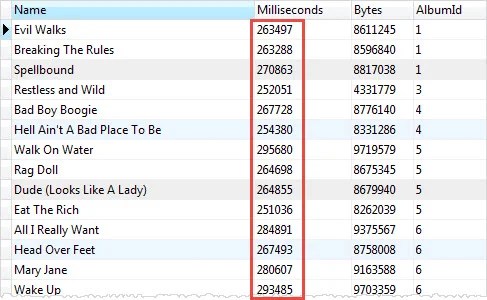
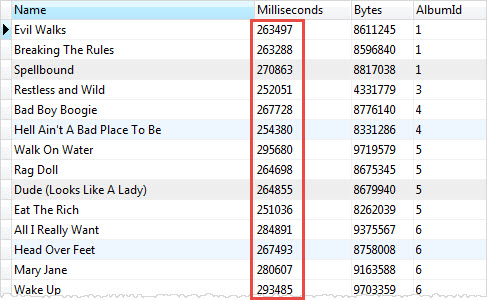
The equality operator (=) is the most commonly used operator. For example, the following query uses the WHERE clause the equality operator to find all the tracks in the album id 1:
SELECT

name,

milliseconds,

bytes,

albumid

FROM

tracks

WHERE

albumid = 1;
SQLite compares the values stored in the AlbumId column with a literal value 1 to test if they are equal. Only the rows that satisfy the condition are returned.
When you compare two values, you must ensure that they are the same data type. You should compare numbers with numbers, string with strings, etc.
In case you compare values in different data types e.g., a string with a number, SQLite has to perform implicit data type conversions, but in general, you should avoid doing this.
You use the logical operator to combine expressions. For example, to get tracks of the album 1 that have the length greater than 200,000 milliseconds, you use the following statement:
SELECT

name,

milliseconds,

bytes,

albumid

FROM

tracks

WHERE

albumid = 1

AND milliseconds > 250000;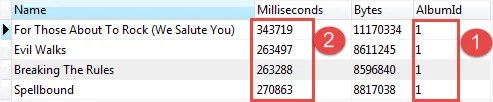
The statement used two expressions albumid = 1 and milliseconds > 250000. It uses the AND logical operator to combine these expressions.
SQLite WHERE clause with LIKE operator example
Sometimes, you may not remember exactly the data that you want to search. In this case, you perform an inexact search using the LIKE operator.
For example, to find which tracks composed by Smith, you use the LIKE operator as follows:
SELECT

name,

albumid,

composer

FROM

tracks

WHERE

composer LIKE '%Smith%'

ORDER BY

albumid;
You get tracks composed by R.A. Smith-Diesel, Adrian Smith, etc.
SQLite WHERE clause with the IN operator example
The IN operator allows you to check whether a value is in a list of a comma-separated list of values. For example, to find tracks that have media type id is 2 or 3, you use the IN operator as shown in the following statement:
SELECT

name,

albumid,

mediatypeid

FROM

tracks

WHERE

mediatypeid IN (2, 3);
In this tutorial, you have learned how to use the SQLite WHERE clause to filter rows in the final result set using comparison and logical operators.