SQLite Python: Querying Data
Summary: in this tutorial, we will show you step by step how to query data in SQLite from Python.
To query data in an SQLite database from Python, you use these steps:
- First, establish a connection to the SQLite database by creating a
Connectionobject. - Next, create a
Cursorobject using the cursor method of theConnectionobject. - Then, execute a
SELECTstatement. - After that, call the
fetchall()method of the cursor object to fetch the data. - Finally, loop the cursor and process each row individually.
In the following example, we will use the tasks table created in the creating tables tutorial.
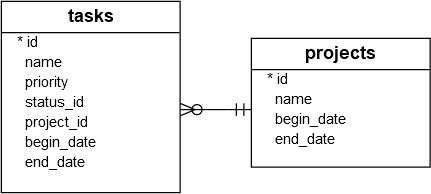
First, create a connection to an SQLite database specified by a file:
def create_connection(db_file):
 """ create a database connection to the SQLite database
 specified by the db_file
 :param db_file: database file
 :return: Connection object or None
 """
 conn = None
 try:
 conn = sqlite3.connect(db_file)
 except Error as e:
 print(e) return conn
Code language: Python (python)
This function selects all rows from the tasks table and displays the data:
def select_all_tasks(conn):
 """
 Query all rows in the tasks table
 :param conn: the Connection object
 :return:
 """
 cur = conn.cursor()
 cur.execute("SELECT * FROM tasks") rows = cur.fetchall() for row in rows:
 print(row)
Code language: Python (python)
In the select_all_tasks() function, we created a cursor, executed the SELECT statement, and called the fetchall() to fetch all tasks from the tasks table.
This function query tasks by priority:
def select_task_by_priority(conn, priority):
 """
 Query tasks by priority
 :param conn: the Connection object
 :param priority:
 :return:
 """
 cur = conn.cursor()
 cur.execute("SELECT * FROM tasks WHERE priority=?", (priority,)) rows = cur.fetchall() for row in rows:
 print(row)
Code language: Python (python)
In the select_task_by_priority() function, we selected the tasks based on a particular priority. The question mark ( ?) in the query is the placeholder. When the cursor executed the SELECT statement, it substituted the question mark ( ?) by the priority argument. The fetchall() method fetched all matching tasks by the priority.
This main() function creates a connection to the database C:\sqlite\db\pythonsqlite.db and calls the functions to query all rows from the tasks table and select tasks with priority 1:
def main():
 database = r"C:\sqlite\db\pythonsqlite.db" # create a database connection
 conn = create_connection(database)
 with conn:
 print("1. Query task by priority:")
 select_task_by_priority(conn, 1) print("2. Query all tasks")
 select_all_tasks(conn)
Code language: Python (python)
Here is the full program:
import sqlite3
from sqlite3 import Errordef create_connection(db_file):
""" create a database connection to the SQLite database
specified by the db_file
:param db_file: database file
:return: Connection object or None
"""
conn = None
try:
conn = sqlite3.connect(db_file)
except Error as e:
print(e)
return conn
def select_all_tasks(conn):
"""
Query all rows in the tasks table
:param conn: the Connection object
:return:
"""
cur = conn.cursor()
cur.execute("SELECT * FROM tasks")
rows = cur.fetchall()
for row in rows:
print(row)
def select_task_by_priority(conn, priority):
"""
Query tasks by priority
:param conn: the Connection object
:param priority:
:return:
"""
cur = conn.cursor()
cur.execute("SELECT * FROM tasks WHERE priority=?", (priority,))
rows = cur.fetchall()
for row in rows:
print(row)
def main():
database = r"C:\sqlite\db\pythonsqlite.db"
# create a database connection
conn = create_connection(database)
with conn:
print("1. Query task by priority:")
select_task_by_priority(conn, 1)
print("2. Query all tasks")
select_all_tasks(conn)
if __name__ == '__main__':
main()
Code language: Python (python)
In this tutorial, you have learned how to develop a Python program to query data from tables in an SQLite database.